

Now open: start a 14-day free trial
Run your whole sign shop, and your RIP, from one place
SignPro takes every job from proposal to production to paid invoice. SignRIP, the professional RIP built into SignPro, handles artwork, color, nesting and cutting. You manage it all from the browser, and the shop keeps printing when the internet doesn't.
14 days free on any plan. Plans from $65 a month, billed annually.
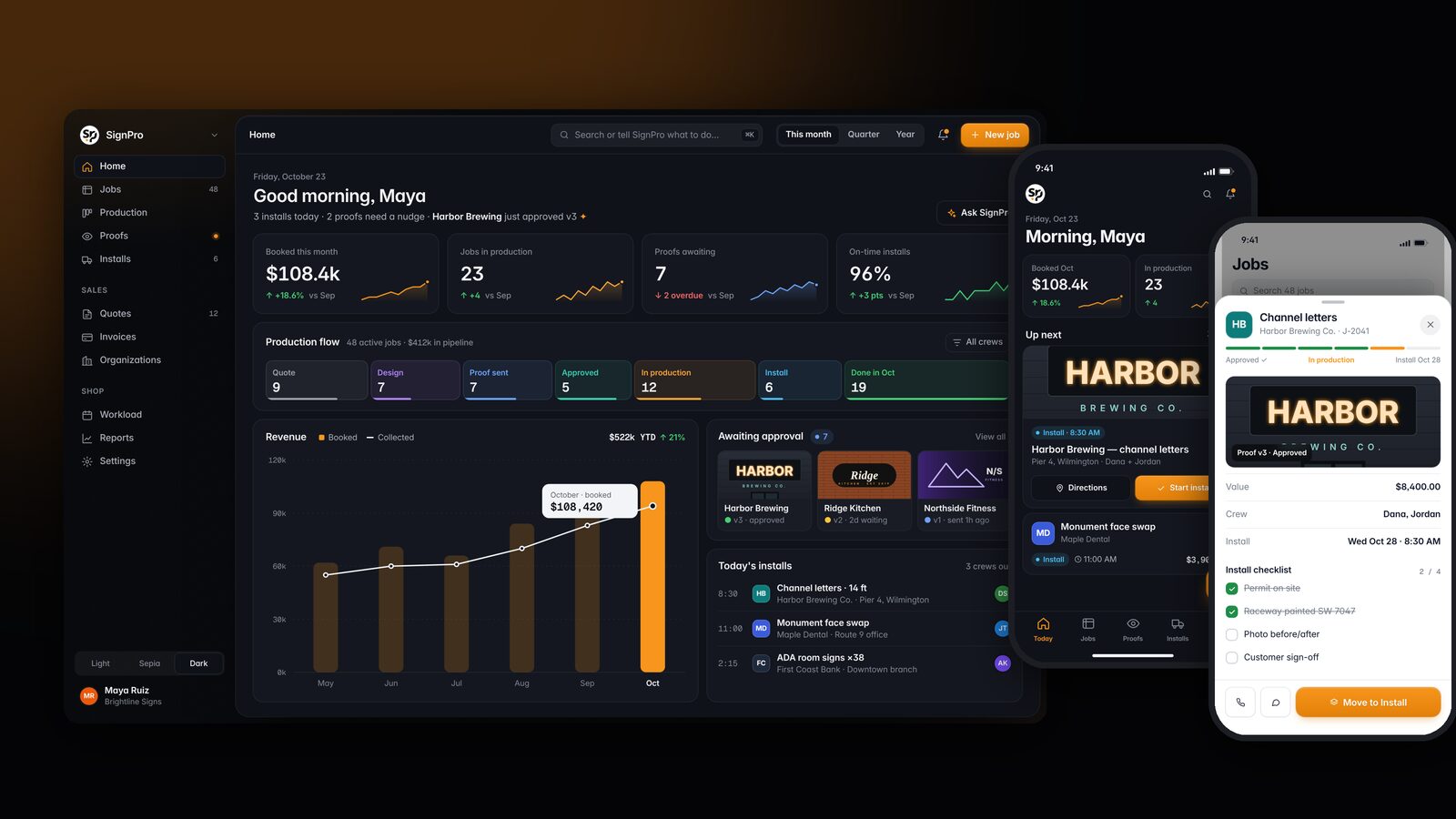
Sign shops run on five tools that don't talk
Quotes in one place, jobs on a whiteboard, invoices in accounting software, and a RIP on a desktop PC in the back that nobody wants to touch. Every handoff is a chance to lose a job, a dollar or a roll of media.
Work falls through the cracks
A proposal is approved but never becomes a job. A job is finished but never invoiced. Nobody notices until the customer calls.
Nobody can see the floor
Where is that channel letter job? Who has it? Is the vinyl in stock? Finding out means walking the shop.
The print room is a black box
Ink, media and rip time never reach job costing, and when the RIP PC or the internet goes down, production stops.
One system from first quote to final payment
Each job carries its proposal, work order, production stage, materials and invoice with it, so everyone works from the same record.
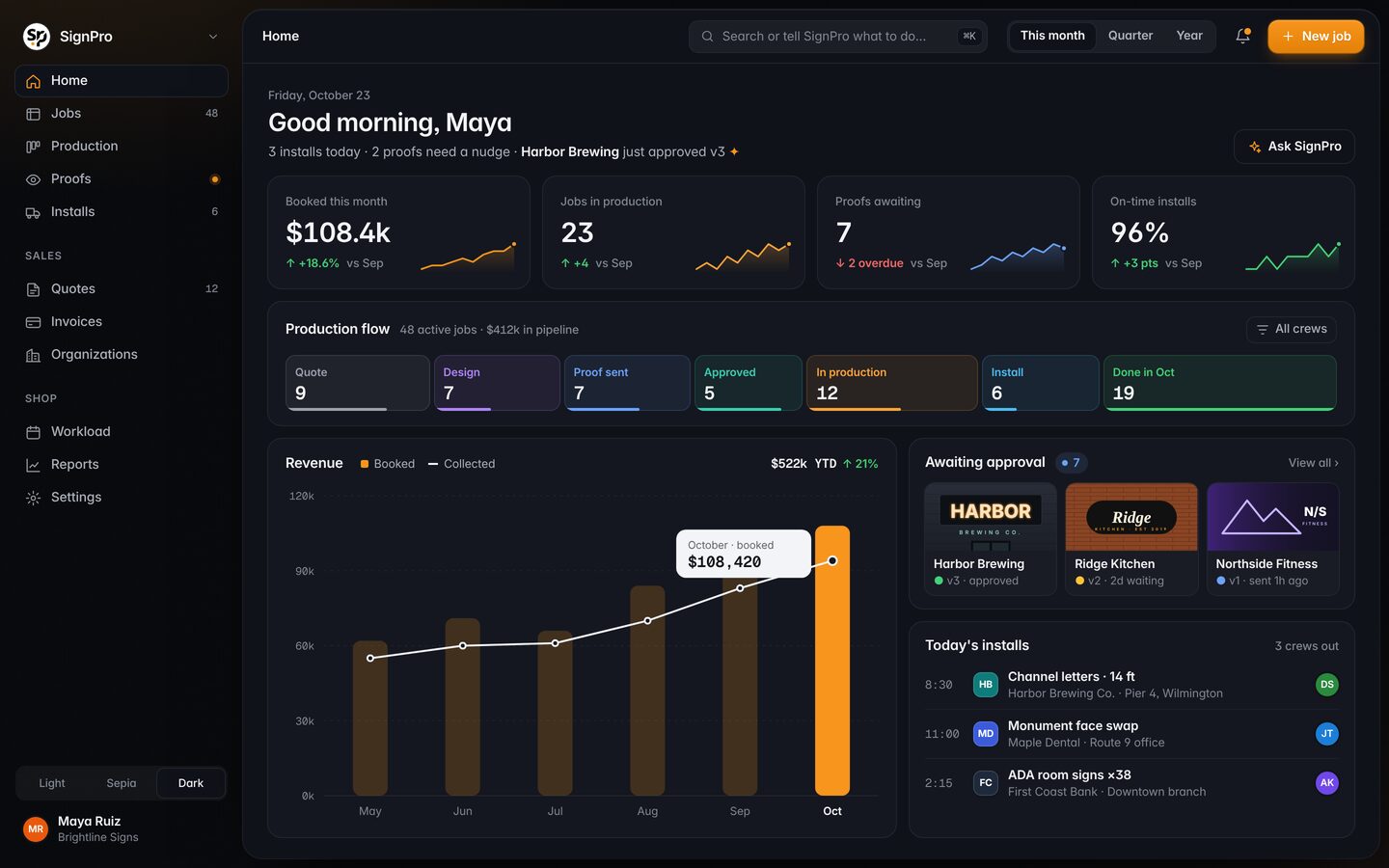
See the whole shop at a glance
Bookings, jobs in production, proofs waiting on customers and today's installs, on one home screen.
- Your pipeline by stage, from quote to done
- Revenue booked and collected
- Today's installs and who's on them
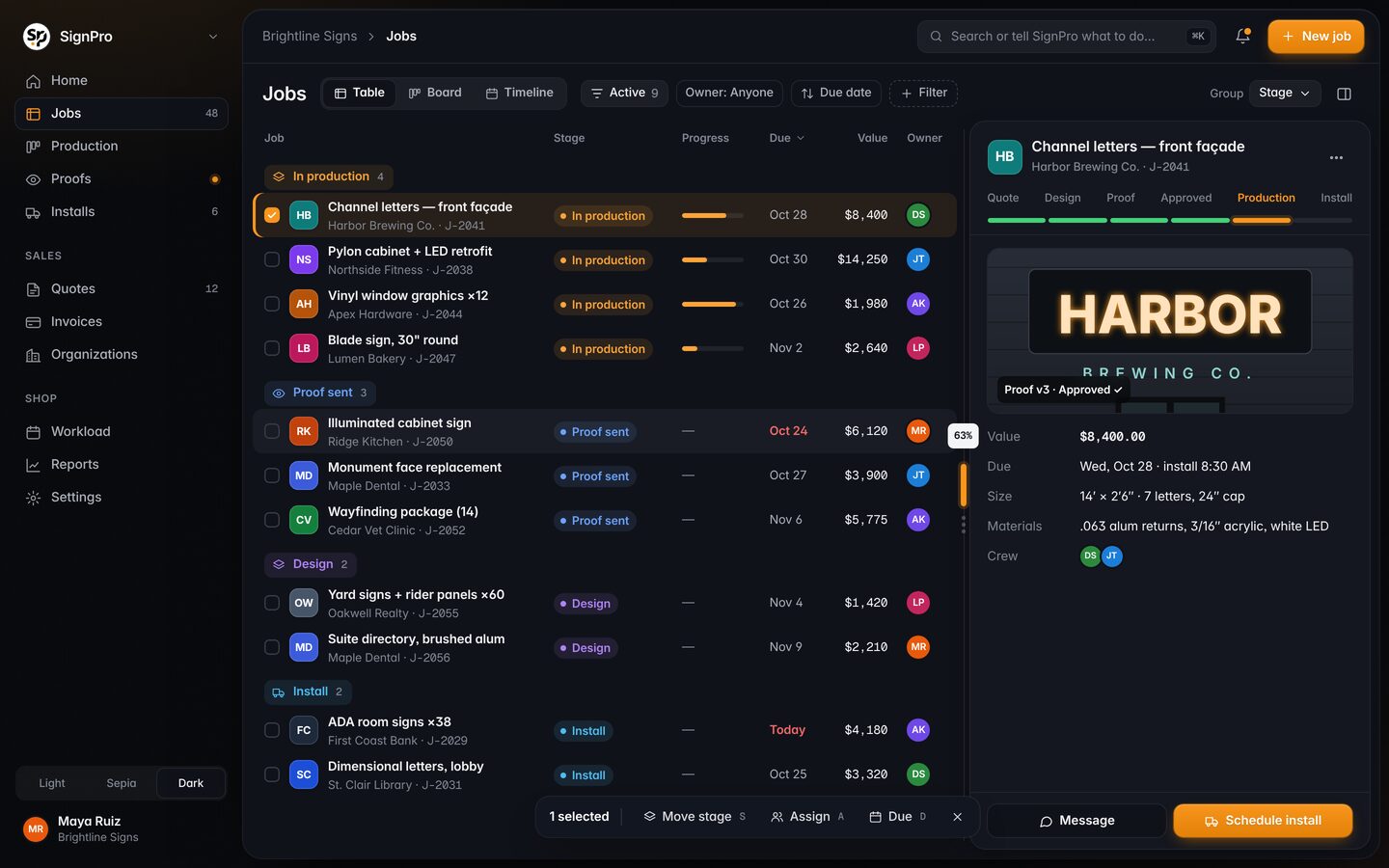
Every job, grouped by where it is
Sort and filter the jobs table by stage, owner and due date, then open any job beside the list without losing your place.
- Value, due date and owner on every row
- Act on several jobs at once
- Job details, size and materials in a side panel
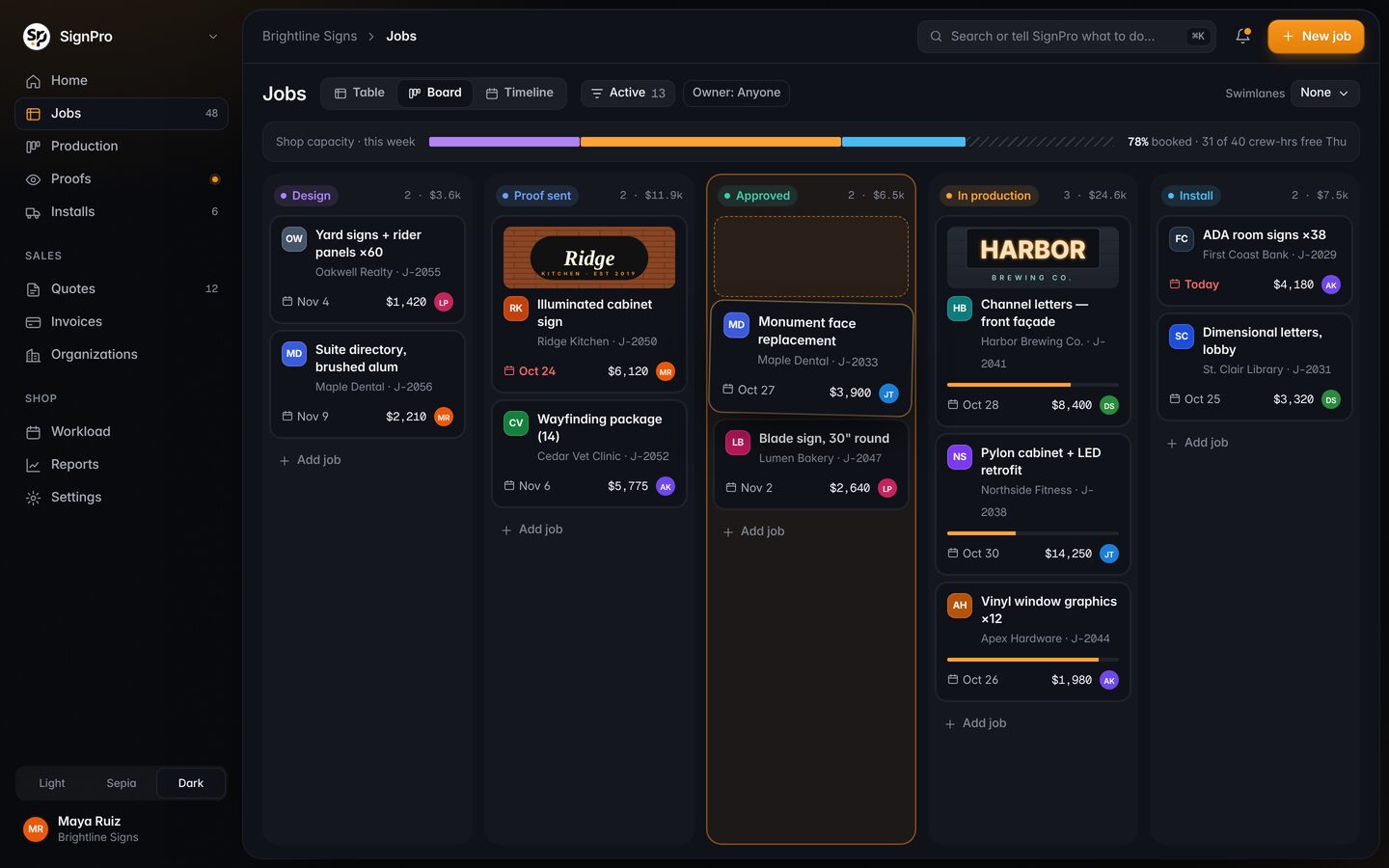
A production board the whole floor can read
Move jobs from design to proof to production to install, with each column's job count and value at the top.
- Board, table or timeline views of the same jobs
- Value and due date on every card
- Overdue work called out in red
Built for the shop floor and the install site
The refreshed interface is designed for phones as well as desktops, so crews can check a job's stage, due date and value away from the office.
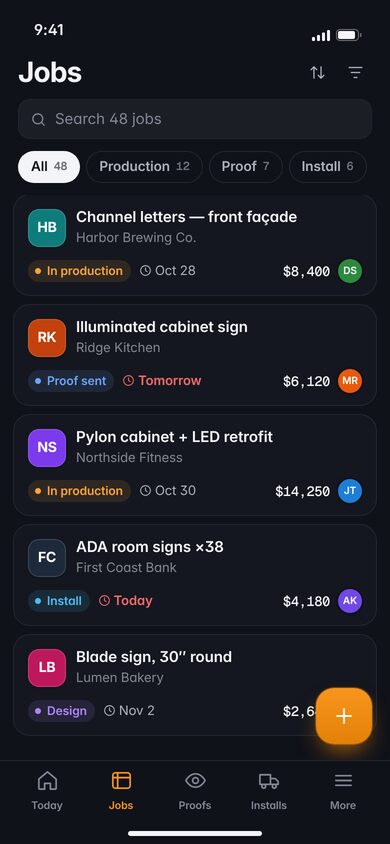
Screens show the refreshed SignPro interface with sample data. It is rolling out to workspaces now.
What SignPro does today
Everything below is built, except the items marked as on the roadmap.
Running the shop
From the first quote to the final payment.
Proposals and estimates
Price the work, send the proposal, and turn it into a job when the customer says yes.
Jobs, work orders and production boards
Track every job by stage in a table or on a board, and give the floor a work order tied to the job.
People and organizations
Customers and contacts linked to their jobs, proposals and invoices.
Invoices and payments
Invoice from the job and get paid online through your own Stripe account.
Inventory and material costing
Know what's on the shelf and what the materials on each job cost.
Your own workspace
Every shop gets its own private workspace. Invite your team and work from any modern browser.
Printing and cutting with SignRIP
A professional RIP, built into SignPro.
SignRIP turns artwork into printer and cutter output. You manage it from the browser in SignPro, and it runs on SignRIP Edge, a small appliance in your shop, written in Rust for stability.
Opens the files you get
PDF (vector art, live text, gradients and images, including JPEG, JPEG 2000, CCITT fax and JBIG2), PostScript and EPS, TIFF, PNG, JPEG and PSD. Spot channels and layers named White or CutContour become ink and cut layers. Every import is previewed in the browser.
Color management
ICC profiles, output profiles built from measured charts, spot color libraries with exact device-ink recipes, soft proofing, ink limits and linearization.
Nesting
Rectangular and true-shape nesting, so contour-cut pieces interlock and use less media.
Print and cut
Barcoded print-and-cut workflows with Graphtec, Summa and Zünd cutters.
Printer pools and status
Pool identical printers so each job goes to the right free one. Printer status and ink levels over SNMP.
Real job costs
Ink use and rip time from each print flow back into job costing.
Reliability
Production that doesn't depend on the internet.
Hybrid cloud and on-site
The cloud is never in the print path. Ripping, printing and cutting keep working through internet outages, and every event is journaled and synced when the connection returns.
Power-loss recovery
When its battery backup reports a power loss, the appliance drains gracefully, then resumes from its journal. A stopped print resumes from the next unprinted tile to save material.
No wasted rolls
A print never starts on a roll that's too short or too narrow for the job.
Safe updates
Appliance updates are signed and installed A/B, with automatic rollback if a new version doesn't come up healthy.
Integrations
Fits into how your shop already works.
Stripe Connect
Customer payments land in your own Stripe account.
Local REST API
A documented API on the appliance, with an OpenAPI description.
Hot folders
Drop a file in a folder and it's queued with that folder's settings.
JDF intake
Take in job tickets from other print systems.
On the roadmap
Coming next. Not available yet.
- In pilotSignRIP Edge appliance hardware. A small on-site box with battery backup that connects to your printers and cutters.
- ComingNative printer drivers for each printer model, starting with HP Latex.
- ComingDirect spectrophotometer control. Today, measurements are imported from your spectro software.
- ComingAppliance licensing.
- In reviewA private shop network connecting your appliances and SignPro.
- In reviewSelf-hosting in Docker for shops that want to run SignRIP on their own hardware.
Simple plans, 14 days free
Pay monthly, or pay annually and save about 17%.
Core
Full shop management for sign and print businesses.
$79/month
or $65/month billed annually ($780/year)
- Proposals, jobs, work orders and invoices
- Online payments through Stripe
- 14-day free trial
Pro
Workflow automation and advanced reporting.
$179/month
or $149/month billed annually ($1,788/year)
- Everything in Core
- Workflow automation
- Advanced reporting
- 14-day free trial
Business
Multi-location shops and in-house production.
$349/month
or $289/month billed annually ($3,468/year)
- Everything in Pro
- Multiple locations
- SignRIP production
- 14-day free trial
Prices in US dollars. SignRIP Edge appliance hardware is in pilot; talk to us about joining.
Your shop's data stays yours
SignPro is built so one shop can never see another's work, and so production keeps running when something fails.
Isolated workspaces
Each shop's records live in their own workspace. The server checks who you are and which workspace you belong to on every change, rather than trusting the browser.
Card data stays with Stripe
Subscriptions and customer payments go through Stripe's hosted checkout, so card numbers never touch SignPro's servers.
Verified print data
Every ripped tile is checksummed and checked again before it's sent to a printer. A damaged tile is never printed; the job is ripped again from its original.
Signed appliance updates
The appliance only installs signed updates, keeps the previous version alongside, and rolls back on its own if a new release fails.
Locked-down local API
The appliance's local API requires access tokens, with read-only tokens for wall displays and status screens.
Works offline
Events wait in an on-disk journal through outages of any length and are synced when the connection returns.
Security questions? Email support@signpro.io.
Questions shops ask
What is SignPro?
Software for sign and print shops that covers the whole flow: proposal, job, production, invoice and payment. It runs in your browser, and SignRIP, the RIP built into it, handles printing and cutting.
Do I need the SignRIP appliance to use SignPro?
No. Shop management runs in your browser. SignRIP is for shops that want the built-in RIP, and its on-site appliance hardware is in pilot.
What happens to printing if our internet goes down?
The cloud is never in the print path. Ripping, printing, cutting, hot folders and the local API keep working on the appliance. Every event is journaled and synced to SignPro when the connection returns.
Which printers and cutters does SignRIP work with?
SignRIP sends cut jobs to Graphtec, Summa and Zünd cutters, and reads printer status and ink levels over SNMP. Native drivers for each printer model are coming, starting with HP Latex. Tell us what you run.
What files can SignRIP open?
PDF, PostScript and EPS, TIFF, PNG, JPEG and PSD, including PSD spot channels and layers named White or CutContour.
How does the free trial work?
Pick a plan, monthly or annual, and the first 14 days are free.
How do my customers pay invoices?
Through Stripe. You connect your own Stripe account, customers pay on Stripe's hosted checkout, and the money goes to your account.
See SignPro in your shop
Start a free trial now, or ask for a walkthrough and we'll get in touch to set one up.